- Page d'accueil /
- Électronique /
- Computer Accessories /
- Computer Accessories & Peripherals /
- Keyboards, Mice & Accessories /
- Computer Keyboards /
- BLACKMAGIC Design Davinci Resolve Speed Edito...
0 ratings

Numéro d'article:
33467923
BLACKMAGIC Design Davinci Resolve Speed Editor (DV/RES/BBPNLMLEKA) Editor Only
Numéro d'article:
33467923
XOF 366955
Price Details
Excluding Shipping & Custom charges ( Shipping and custom charges will be calculated on checkout )
*All items will import from États-Unis
0 ratings
Écrire un commentaire
En stock
 Importé depuis la boutique USA
QTY:
Commandez maintenant et recevez votre commande aux alentours du Mardi, Août 11
Transaction sécurisée
Ubuy s'engage à protéger votre sécurité et votre confidentialité. Notre système avancé de sécurité des paiements garantit la confidentialité en chiffrant vos informations lors de la transmission grâce aux protocoles AES (Advanced Encryption Standards) et SSL (Secure Socket Layer). Vos coordonnées de paiement sont 100 % sécurisées car nous ne partageons pas vos informations de paiement avec des vendeurs tiers.
Nos meilleurs partenaires logistiques


DaVinci Resolve delivers the cut of the next generation.

Livraison
rapide

Retour
gratuit*

Emballage sécurisé

Produits 100 % originaux

Conformité PCI DSS

Certifié ISO 27001


Note: Step Down Voltage Transformer required for using electronics products of États-Unis store (110-120). Recommended power converters Acheter maintenant.


Ce qui se démarque
Dedicated Editing Tool
The Speed Editor offers a streamlined, dedicated interface tailored for professional video editing, significantly enhancing workflow efficiency compared to general-purpose tools.
Smart Playback Controls
Equipped with intelligent playback features, it simplifies timeline navigation and clip editing, allowing users to focus more on creativity without getting bogged down by technical limitations.
Robust Software Integration
Seamlessly integrates with DaVinci Resolve, providing instant access to essential editing functions, which empowers creators to produce high-quality content faster and with less friction.
Détails du produit
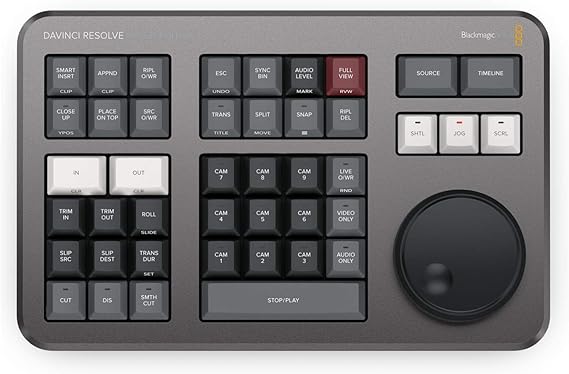
- Compact and portable BLACKMAGIC DESIGN DaVinci Resolve Speed Editor
- Features built-in Search Dial and Keyboard Shortcuts for quick editing functions
- Offers Bluetooth or USB Connectivity for wireless or wired use
- Provides dedicated push buttons for controlling edit modes, timeline navigation, and effects
- Comes with a rechargeable battery and can be connected to a computer via USB Type-C cable
- Designed to work seamlessly with macOS or Windows editing systems running DaVinci Resolve
| Compatible Devices | PC |
| Connectivity Technology | Usb |
| Additional Features | Portable |
| Keyboard Backlighting Color Support | Single Color |
| Power Source | USB-C |
| Switch Type | Tactile |
| Keyboard Layout | QWERTY |
| Hand Orientation | Ambidextrous |
| Button Quantity | 104 |
| Mechanical Keyboard Switch Model | Tactile |
| Minimum Required Operating System Version | Windows 10 |
| Compatible Operating System Family | Windows |
| Number of Keys | 104 |
| Color | Black |
| Style Name | Contemporary |
| Theme | RGB |
| Brand | Blackmagic-Design |
| Keyboard Description | USB |
| Antenna Location | Location |
| Built-In Media | BLACKMAGIC DESIGN DaVinci Resolve Speed Editor |
| Model Number | DV/RES/BBPNLMLEKA |
| Global Trade Identification Number | 09338716006988 |
| Unit Count | 1.0 Count |
| Manufacturer | Blackmagic Design |
| Item Weight | 1 Kilograms |
| Mfr Part Number | DV/RES/BBPNLMLEKA |
| Item Dimensions L x W x H | 6.14"L x 9.65"W x 1.73"H (15.6 x 24.5 x 4.4 cm) |
| Enclosure Material | Plastic |
| Recommended Uses For Product | Location |
| Special Feature | Portable |
| Keyboard backlighting color support | Single Color |
| Style | Contemporary |
| Product Dimensions (L x W x H) | 6.14"L x 9.65"W x 1.73"H (15.6 x 24.5 x 4.4 cm) |
| Country of Origin | This item will be imported from US |
| Date First Available | April 13, 2021 |
À qui est-ce destiné ?

-
Professional Editors
Ideal for professional video editors seeking efficient tools to enhance their editing speed and workflow in DaVinci Resolve.
-
Content Creators
Perfect for content creators who aim to produce high-quality videos quickly using intuitive controls and shortcuts.
-
Film Students
Great for film students looking to familiarize themselves with industry-standard tools while learning video editing skills effectively.

-
Casual Users
Not suitable for casual users who need simple editing tools, as it requires a learning curve for effective use.
DESCRIPTION DU PRODUIT
BLACKMAGIC Design Davinci Resolve Speed Editor (DV/RES/BBPNLMLEKA) Editor Only
Vous avez une question ? Chattez avec nous
Questions et réponses des clients
-
question:
What is the BLACKMAGIC DESIGN Davinci Resolve Speed Editor?
répondre: The BLACKMAGIC DESIGN Davinci Resolve Speed Editor is a professional editing keyboard designed specifically for use with DaVinci Resolve software. It features an innovative layout that enhances editing efficiency, including a unique multi-function knob for quick access to various editing functions. This tool is ideal for video editors looking to streamline their workflow, making it easier to navigate timelines, adjust settings, and trim clips seamlessly. -
question:
How does the Speed Editor enhance video editing workflows?
répondre: The Speed Editor is engineered to minimize the traditional reliance on mouse clicks and keyboard shortcuts, allowing editors to focus on their creative process. Its compact design houses buttons tailored to essential editing and playback features, enabling users to perform complex actions quickly. This makes it perfect for both professional and novice editors aiming for a faster, more intuitive editing experience. -
question:
What functionalities does the multi-function knob support?
répondre: The multi-function knob on the Speed Editor allows for precise control over various settings, such as timeline navigation, clip speed adjustments, and zooming in and out of sections. By simply rotating or pressing the knob, users can easily access critical functions that would typically require multiple keystrokes or mouse actions. This makes it an invaluable tool for filmmakers and video content creators who need to operate quickly without sacrificing accuracy. -
question:
Is the Speed Editor compatible with all versions of DaVinci Resolve?
répondre: Yes, the Speed Editor is compatible with all versions of DaVinci Resolve, including the free version. This means that whether you’re using DaVinci Resolve for basic editing or advanced color grading, you can take full advantage of the Speed Editor's capabilities. It is particularly beneficial for users looking to optimize their editing process in high-pressure environments, like film production sets or post-production studios. -
question:
What types of projects is the Speed Editor best suited for?
répondre: The Speed Editor is designed for a wide range of projects, from short films to full-length documentaries and corporate videos. Its features cater to both multi-camera edits and straightforward cuts, making it versatile enough for various producing styles. Users working on time-sensitive projects will find that the Speed Editor significantly accelerates their editing speed, allowing for fast turnaround times in high-demand situations. -
question:
Does the Speed Editor come with any software?
répondre: The Speed Editor does not come with a separate software package as it is primarily designed to work with DaVinci Resolve, which is available as a free download. Upon purchasing the Speed Editor, you will be able to immediately leverage its full potential alongside the powerful editing tools offered by DaVinci Resolve, making it an excellent addition for anyone serious about video editing. -
question:
Can I integrate the Speed Editor with other video editing software?
répondre: The Speed Editor is specifically designed for DaVinci Resolve, and while some basic features may work with other software, optimal functionality is achieved when used within the DaVinci Resolve ecosystem. For editors who predominantly use Resolve, this integration enhances their workflow, allowing for a more specialized experience that caters to the nuances of the software. -
question:
What are some user settings I can customize on the Speed Editor?
répondre: You can customize several user settings on the Speed Editor, including shortcuts for favorite tools, layout adjustments, and knob functions through the DaVinci Resolve preferences. This allows each user to tailor the Speed Editor to their editing style and preferences, making workflows more intuitive and personal. Customizations are particularly useful for seasoned editors who have specific techniques they prefer to use. -
question:
How does the Speed Editor compare to traditional editing setups?
répondre: The Speed Editor offers a more streamlined alternative compared to traditional setups that often rely on a mouse and keyboard combo. Its tactile controls allow for a more immersive editing experience, as you can manipulate timelines in real-time without losing focus on the project. Video editors can complete edits more efficiently while maintaining a strong connection with their material, enhancing overall productivity. -
question:
Where can I buy BLACKMAGIC DESIGN Davinci Resolve Speed Editor DVRESBBPNLMLEKA in Senegal?
répondre: You can buy the BLACKMAGIC DESIGN Davinci Resolve Speed Editor DVRESBBPNLMLEKA from Ubuy. They offer a wide selection of electronics and tools for video editing, making it easy for you to purchase this professional editing keyboard. Ubuy provides a user-friendly shopping experience and ensures that you can quickly find the Speed Editor to enhance your editing skills.
Blackmagic Design Keyboards DV/RES/BBPNLMLEKA Editorial Review
Aucune critique éditoriale trouvée
Avis et évaluations clients
1 évaluations des clients
-
5 étoile
100%
-
4 étoile
0%
-
3 étoile
0%
-
2 étoile
0%
-
1 étoile
0%
Donnez votre avis sur ce produit
Partagez votre avis avec d'autres clients
Platform Trust & Buyer Confidence

MA
Mohammad
Verified buyer
“Excellent quality and original too,when ubuy send original things I will appreciate that ,I very satisfied thank you”
23 July 2026 · via Trustpilot
CK
Chitra
Verified buyer
“The order and delivery progress was communicated very well. Package arrived within the estimated time. Products arrived as expected in good condition.”
22-Jul-26 · via Trustpilot
K
kund
Verified buyer
“Good supply of products. Safe payment methods, and shipment worldwide! Genuine products.”
23-Jul-26 · via Trustpilot
OO
Onesi
Verified buyer
“Was my first time buying a product from Ubuy, but I found it so helpful. This is reliable. Gonna place a new order!”
22 July 2026 · via Trustpilot
SJ
SAO JOHN
Verified buyer
“Ubuy is a great online platform to buy stuff. Reliable, fast delivery time and great value for money. I've been using Ubuy online shopping platform for three years now and will continue to do so.”
23 July 2026 · via Trustpilot
Paiement sécurisé
Global Delivery
Easy Returns
Genuine Products
Historique des prix du produit
Informations importantes
- Limitations : Pour les produits expédiés à l'international, veuillez noter que toute garantie du fabricant peut ne pas être valide ; les options de service du fabricant peuvent ne pas être disponibles ; les manuels, instructions et avertissements de sécurité des produits peuvent ne pas être dans les langues du pays de destination ; les produits (et les matériaux qui les accompagnent) peuvent ne pas être conçus conformément aux normes, spécifications et exigences d'étiquetage du pays de destination ; et les produits peuvent ne pas être conformes à la tension et aux autres normes électriques du pays de destination (nécessitant l'utilisation d'un adaptateur ou d'un convertisseur le cas échéant). Il incombe au destinataire de s'assurer que le produit peut être importé légalement dans le pays de destination. En cas de commande auprès d'Ubuy ou de ses filiales, le destinataire est l'importateur officiel et doit se conformer à toutes les lois et réglementations du pays de destination.
- Tous les produits listés sur Ubuy ne sont pas à vendre, Ubuy étant un moteur de recherche mondial. Les produits sont soumis aux réglementations en matière d'exportation et de commerce.
XOF 366955
Commandez maintenant et recevez votre commande aux alentours du Mardi, Août 11
This item is not restrict in my country.(Please click on above link if this item is not restrict in your country, So our team will review and allow.)
QTY:
Transaction sécurisée
PCI DSS compliant and ISO 27001:2022 certified, with encrypted payments and full buyer protection on every order.
Nos meilleurs partenaires logistiques
Livraison transfrontalière la plus rapide
Caractéristiques et avantages
- Designed specifically for the cut workspace to enhance cutting speed.
- Experience unparalleled precision with tactile touch controls and metal search regulator.
- Wireless Bluetooth connectivity and USB-C option for ultimate portability.
- Enhanced workflow with dedicated cut-specific keys and live trimming capabilities.
- Transport buttons allow for rapid playback control with easy thumb access.
- Innovative Source Tape mode simplifies clip selection, making your workflow more efficient.
Ubuy Assurance
Experience worry-free shopping with 100% original products, PCI DSS-compliant payment security, ISO 27001-certified data protection, the fastest cross-border delivery, free returns *, and secure packaging on every order.