- Page d'accueil /
- High-tech /
- Accessoires informatiques /
- Computer Accessories & Peripherals /
- Accessoires pour disques durs /
- Caddies /
- 2nd HDD SSD Hard Drive Optical Bay Caddy Fram...
0 ratings


Numéro d'article:
12300122
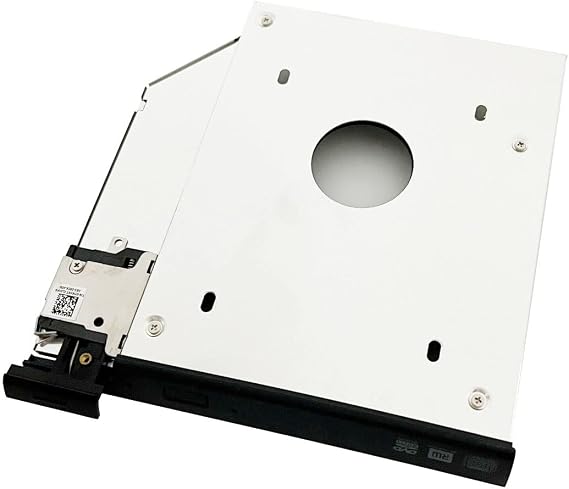
2nd HDD SSD Hard Drive Optical Bay Caddy Frame Tray Bracket for Dell Latitude E6440 E6540 Precision M2800 with Ejector + Bezel/faceplate
87% des répondants recommanderaient ceci à un ami
Numéro d'article:
12300122
XOF 22287
Détails du prix
Hors frais de livraison et de douane ( Les frais de livraison et de douane seront calculés lors du paiement )
*Tous les articles seront importés depuis États-Unis
0 ratings
Écrire un commentaire
En stock
 Importé depuis la boutique USA
Commandez maintenant et recevez votre commande aux alentours du Monday, Octobre 19
Transaction sécurisée
Ubuy s'engage à protéger votre sécurité et votre confidentialité. Notre système avancé de sécurité des paiements garantit la confidentialité en chiffrant vos informations lors de la transmission grâce aux protocoles AES (Advanced Encryption Standards) et SSL (Secure Socket Layer). Vos coordonnées de paiement sont 100 % sécurisées car nous ne partageons pas vos informations de paiement avec des vendeurs tiers.
Nos meilleurs partenaires logistiques


Add a 2nd drive to your laptop by replacing your optical drive for maximum data storage flexibility.

Livraison
rapide

Retour
gratuit*

Emballage sécurisé

Produits 100 % originaux

Conformité PCI DSS

Certifié ISO 27001



Note: Step Down Voltage Transformer required for using electronics products of États-Unis store (110-120). Recommended power converters Acheter maintenant.


Détails du produit
| Hard Disk Interface | Serial ATA |
| Connectivity Technology | SATA |
| Additional Features | Portable |
| Hard Disk Form Factor | 2.5 Inches (6.4 cm) |
| Compatible Devices | Laptop |
| Hard Disk Rotational Speed | 7200.0 |
| Specific Uses For Product | Personal |
| Form Factor | 2.5-inch (6.4 cm) |
| Hardware Connectivity | Solid State Drive |
| Hardware Platform | PC |
| Hard-Drive Size | 2.5 |
| Unit Count | 1.0 Count |
| Brand | NIGUDEYANG |
| Hard Disk Description | Mechanical Hard Disk, Solid State Drive |
| Built-In Media | Caddy, Bezel/faceplate, Ejector latch |
| Manufacturer | by third-factory produce |
| UPC | 747180291902 |
| Mfr Part Number | 4328327252 |
| Installation Type | Plug In |
| Special Feature | Portable |
| Hard Disk Size | 2.5 |
| Item Weight | 0.5 lbs (230 grams) |
DESCRIPTION DU PRODUIT
2nd HDD SSD Hard Drive Optical Bay Caddy Frame Tray Bracket for Dell Latitude E6440 E6540 Precision M2800 with Ejector + Bezel/faceplate
Vous avez une question ? Chattez avec nous
Questions et réponses des clients
-
question:
What is the purpose of the 2nd HDD SSD Hard Drive Optical Bay Caddy for Dell Latitude E6440 and E6540?
répondre: The 2nd HDD SSD Hard Drive Optical Bay Caddy allows you to add a second hard drive or SSD to your Dell Latitude E6440 or E6540 laptop, replacing the optical drive. This is particularly useful for users who require additional storage or wish to boost performance by using an SSD. By using this caddy, you can efficiently manage large files, run multiple applications simultaneously, or enhance your machine's speed for gaming and video editing. It's an excellent upgrade for professionals and power users. -
question:
Is the installation of the caddy straightforward?
répondre: Yes, installing the caddy is designed to be user-friendly and does not require professional assistance. Generally, you just need to remove the optical drive, insert the caddy with the HDD or SSD into the bay, and secure it. Tools are typically minimal, often just a screwdriver. This upgrade can significantly expand your storage capacity while keeping your laptop compact, making it ideal for users who need more space without sacrificing portability. -
question:
What types of drives are compatible with the caddy?
répondre: The caddy is compatible with standard 2.5-inch SATA HDDs and SSDs, widely used across various computing devices. It's important to check that your drive adheres to the SATA standard to ensure compatibility. Upgrading to an SSD can result in faster boot times and improved application performance, making this a desirable enhancement for anyone looking to optimize the functionality of their Dell laptop. -
question:
Will I need additional software to use the caddy effectively?
répondre: In most cases, additional software is not required once the caddy and hard drive or SSD are installed. The operating system should recognize the new drive automatically. However, to maximize the performance of an SSD, you might consider configuring settings such as TRIM support and system optimizations. This ensures you get the best out of your upgrade, whether for gaming or professional workloads. -
question:
Does this caddy come with all necessary installation materials?
répondre: Yes, the caddy typically comes with the required frame, tray, ejector mechanism, and bezel/faceplate for a complete installation. These components ensure your added drive fits securely and maintains the professional appearance of your laptop. Having everything included eliminates the need for additional purchases, making it a convenient choice for users looking to enhance their storage setup. -
question:
Can I still use my optical drive if I use this caddy?
répondre: No, this caddy is designed to replace the optical drive in your laptop. If you need to use an optical drive, you either have to remove the caddy and revert to the original drive or explore external USB optical drives for occasional use. Many users, however, opt for the extra storage capacity provided by the caddy, particularly as digital media continues to replace physical formats. -
question:
Is there a weight limit for the drives used in the caddy?
répondre: The caddy is designed to accommodate standard 2.5-inch drives with a typical weight limit in line with SATA drives. It is recommended to avoid using excessively large or heavy drives, as this may affect the installation and operation of the caddy within the laptop chassis. Keeping within the standard drive specifications ensures that the drive operates seamlessly and that the caddy remains secure during use. -
question:
What advantages does using an SSD over an HDD provide?
répondre: Using an SSD provides distinct advantages such as faster data access speeds, increased durability (no moving parts), and lower power consumption compared to traditional HDDs. This results in shorter boot times, quicker file transfers, and a snappier overall system performance. For users who run demanding applications or multitask frequently, upgrading to an SSD via this caddy can lead to significant enhancements in productivity and overall user experience. -
question:
Where can I buy the 2nd HDD SSD Hard Drive Optical Bay Caddy Frame for my Dell laptop?
répondre: You can purchase the 2nd HDD SSD Hard Drive Optical Bay Caddy Frame Tray Bracket for Dell Latitude E6440 E6540 and Precision M2800 at Ubuy in Senegal. Ubuy offers a convenient platform for finding this caddy along with competitive pricing and various shopping options, making it easy to enhance your laptop's storage capabilities.
NIGUDEYANG Caddies Editorial Review
Aucune critique éditoriale trouvée
Avis et évaluations clients
1 évaluations des clients
-
5 étoile
100%
-
4 étoile
0%
-
3 étoile
0%
-
2 étoile
0%
-
1 étoile
0%
Donnez votre avis sur ce produit
Partagez votre avis avec d'autres clients
CONFIANCE EN LA PLATEFORME & PROTECTION DE L'ACHETEUR

JK
Jasmin
Acheteur vérifié
“Great products and very good service: very easy and very fast international delivery.”
9 September 2026 · via Trustpilot
AG
Anke
Acheteur vérifié
“Wonderful online shopping experience, smooth transaction from the start. Payment method works conveniently and delivery is unexpectedly fast and reliable. You go the extra mile for service. What makes this even more amazing, you deliver to Namibia. I will remain a happy Ubuy customer and will increase my purchases for sure! Thank you!”
10 September 2026 · via Trustpilot
H
Hazel
Acheteur vérifié
“Very easy to find the products what you need, and so fast delivery, that’s why I highly recommended to others costumers to used ubuy.”
10 September 2026 · via Trustpilot
O
Opaleye
Acheteur vérifié
“I received exactly what I ordered I was skeptical about your site because that was my first time to order. But the order came timely and neatly packaged. I was not disappointed. Thank you.”
11 September 2026 · via Trustpilot
AC
Adele
Acheteur vérifié
“Easy to find and order what you want on the website. Delivery is quick to the UK”
8 September 2026 · via Trustpilot
Paiement sécurisé
Global Delivery
Retours faciles
Genuine Products
Historique des prix du produit
Informations importantes
- Limitations : Pour les produits expédiés à l'international, veuillez noter que toute garantie du fabricant peut ne pas être valide ; les options de service du fabricant peuvent ne pas être disponibles ; les manuels, instructions et avertissements de sécurité des produits peuvent ne pas être dans les langues du pays de destination ; les produits (et les matériaux qui les accompagnent) peuvent ne pas être conçus conformément aux normes, spécifications et exigences d'étiquetage du pays de destination ; et les produits peuvent ne pas être conformes à la tension et aux autres normes électriques du pays de destination (nécessitant l'utilisation d'un adaptateur ou d'un convertisseur le cas échéant). Il incombe au destinataire de s'assurer que le produit peut être importé légalement dans le pays de destination. En cas de commande auprès d'Ubuy ou de ses filiales, le destinataire est l'importateur officiel et doit se conformer à toutes les lois et réglementations du pays de destination.
- Tous les produits listés sur Ubuy ne sont pas à vendre, Ubuy étant un moteur de recherche mondial. Les produits sont soumis aux réglementations en matière d'exportation et de commerce.
XOF 22287
Commandez maintenant et recevez votre commande aux alentours du Monday, Octobre 19
This item is not restrict in my country.(Please click on above link if this item is not restrict in your country, So our team will review and allow.)
QTY:
Transaction sécurisée
Conforme PCI DSS et certifié ISO 27001:2022, avec des paiements chiffrés et une protection complète de l'acheteur pour chaque commande.
Nos meilleurs partenaires logistiques
Livraison transfrontalière la plus rapide
Caractéristiques et avantages
- Transform your laptop with a second hard drive for increased storage capacity.
- Compatible with 2.5 inch 9.5mm and 7mm SATA HDD/SSD.
- Easy installation by simply replacing your existing CD-ROM drive.
- Built-in eject/lock mechanism for secure operation.
- Includes matched bezel/faceplate for a sleek finish.
- Guaranteed performance with third-party quality assurance.
Assurance Ubuy
Profitez d'une expérience d'achat sereine avec des produits 100 % originaux, une sécurité de paiement conforme PCI DSS, une protection des données certifiée ISO 27001, la livraison transfrontalière la plus rapide, les retours gratuits* et un emballage sécurisé pour chaque commande.